1. Introduction
This introduction will show how to use mecoSHARK. Furthermore, we list all requirements for this tool here, so that an easy installation is possible.
mecoSHARK collects over 70 different static product metrics and over 15 different code clone metrics. A full list of the calculated metrics can be found in our database documentation. Furthermore, mecoFoo detects type-2 clones in the code.
The tool works on a revision of a repository, where vcsSHARK was executed beforehand. Generally, mecoSHARK works in two phases: first, the programming language of the project is automatically detected by using sloccount. If a given threshold is reached (% of files that are written in a certain programming language), we execute the metrics calculator and clone parser for this kind of programming language. Currently, we support Java and Python. Second, the results are parsed and stored in the MongoDB using the mongoengine ORM library.
For the metrics calculation and clone detection we use sourcemeter. Additionally, SourceMeter provides the option to build the project via Ant or Maven and calculate the metrics afterwards. We have implemented, but currently disabled, this feature in mecoSHARK, as it is not tested in-depth.
We use a vanilla Ubuntu 16.04 operating system as basis for the steps that we describe. If necessary, we give hints on how to perform this step with a different operating system.
Warning
This software is still in development.
1.1. Model Documentation
The documentation for the used database models can be found here: https://smartshark.github.io/pycoSHARK/api.html
1.2. Installation
The installation process needs a little bit more effort, as sourcemeter can not be publicly distributed. For a vanilla Ubuntu 16.04, we need to install the following packages:
$ sudo apt-get install git python3-pip python3-cffi
You also need to install JAVA. For more information follow this link: https://wiki.ubuntuusers.de/Java/Installation
After these requirements are met, first clone the mecoSHARK repository repository to a folder you want. In the following, we assume that you have cloned the repository to ~/mecoSHARK. Afterwards, the installation of mecoSHARK can be done in two different ways:
1.2.1. via Pip
$ sudo pip3 install https://github.com/smartshark/mecoSHARK/zipball/master --process-dependency-links
1.2.2. via setup.py
$ sudo python3.5 ~/mecoSHARK/setup.py install
Note
It is advisable to change the location, where the logs are written to. They can be changed in the ~/mecoSHARK/mecoshark/loggerConfiguration.json. There are different file handlers defined. Just change the “filename”-attribute to a location of your wish.
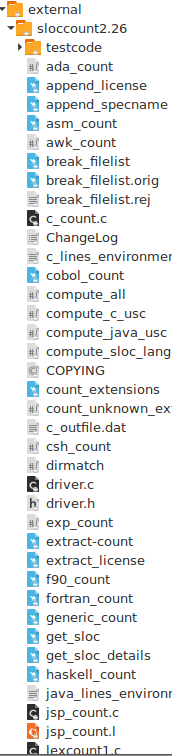
Afterwards, you need to download sourcemeter and create the following structure:
Overall structure:

Sloccount structure:
Warning
Make sure, that your $JAVA_HOME is set correctly!
Warning
Make sure, that /external/sloccount2.26 is in your $PATH.
Furthermore, you need a running MongoDB. The process of setting up a MongoDB is explained here: https://docs.mongodb.com/manual/installation/
1.3. Tests
The tests of mecoSHARK can be executed by calling
$ python3.5 ~/mecoSHARK/setup.py test
The tests can be found in the folder “tests”.
Warning
The generated tests are not fully complete. They just test the basic functionality.
1.4. Execution
In this chapter, we explain how you can execute mecoSHARK. Furthermore, the different execution parameters are explained in detail.
Choose a project from which you want to collect metrics
Clone this project
Make sure that your MongoDB is running!
$ sudo systemctl status mongodb
Execute vcsSHARK on this project
Set the project you want to analyze to a specific revision
Execute mecoSHARK by calling
$ python3.5 ~/mecoSHARK/main.py
mecoSHARK supports different commandline arguments:
-
--help,-h¶ shows the help page for this command
-
--version,-v¶ shows the version
-
--db-user<USER>,-U<USER>¶ Default: None
mongodb user name
-
--db-password<PASSWORD>,-P<PASSWORD>¶ Default: None
mongodb password
-
--db-database<DATABASENAME>,-DB<DATABASENAME>¶ Default: smartshark
database name
-
--db-hostname<HOSTNAME>,-H<HOSTNAME>¶ Default: localhost
hostname, where the mongodb runs on
-
--db-port<PORT>,-p<PORT>¶ Default: 27017
port, where the mongodb runs on
-
--db-authentication<DB_AUTHENTICATION> -a <DB_AUTHENTICATION>¶ Default: None
name of the authentication database
-
--ssl¶ enables ssl for the connection to the mongodb
-
--debug<DEBUG_LEVEL>,-d<DEBUG_LEVEL>¶ Default: DEBUG
Debug level (INFO, DEBUG, WARNING, ERROR)
-
--repository_url<URL>,-u<URL>¶ Required
URL of the project (e.g., https://github.com/smartshark/mecoSHARK)
-
--revision<REVISION_HASH>,-r<REVISION_HASH>¶ Required
Hash of the revision that is analyzed
-
--input<PATH>,-i<PATH>¶ Required
Path to the repository that should be analyzed
-
--output<PATH>,-o<PATH>¶ Required
Path to a folder that can be used as output
-
--makefile-contents¶ Default: None
Contents of the makefile (only for c/c++/c#), e.g., “./configurenmake”.
1.5. Tutorial
In this section we show step-by-step how you can store metrics of the Zookeeper project in the MongoDB
1. First, you need to have a mongodb running (version 3.2+). How this can be achieved is explained here: https://docs.mongodb.org/manual/.
Warning
Make sure, that you activated the authentication of mongodb (mecoSHARK also works without authentication, but with authentication it is much safer!). Hints how this can be achieved are given here.
Add zookeeper to the projects table in MongoDB.
$ mongo
$ use smartshark
$ db.project.insert({"name": "Zookeeper"})
Install vcsSHARK
Enter the vcsSHARK directory via
$ cd vcsSHARKClone the Zookeeper repository to your home directory (or another place)
$ git clone https://github.com/apache/zookeeper ~/Zookeeper
Execute vcsSHARK:
$ cd ~/vcsSHARK
$ python3.5 ~/vcsSHARK/vcsshark.py -D mongo -DB smartshark -H localhost -p 27017 -n Zookeeper --path ~/Zookeeper
Set Zookeeper to the revision: edf75b5e31f0d9e2fbfadbd95bae9d1d6c4737f6
$ cd ~/Zookeeper
$ git reset --hard edf75b5e31f0d9e2fbfadbd95bae9d1d6c4737f6
Install mecoSHARK. An explanation is given above.
Enter the mecoSHARK directory via
$ cd ~/mecoSHARKTest if everything works as expected
$ python3.5 main.py --help
Note
If you receive an error here, it is most likely, that the installation process failed.
Create an empty directory
$ mkdir ~/temp
Execute mecoSHARK:
$ cd ~/mecoSHARK
$ python3.5 main.py -i ~/Zookeeper -o ~/temp -r edf75b5e31f0d9e2fbfadbd95bae9d1d6c4737f6 -u https://github.com/apache/zookeeper
Thats it. The results are explained in the database documentation of SmartSHARK.